Bypassing the BulletDecorator
October 19, 2007
New York, N.Y.
Got an email this morning from someone trying to make the WPF CheckBox control look a little different. When you set an image or drawing as the content of a CheckBox, the checkmark box is vertically centered, like in the image on the left:
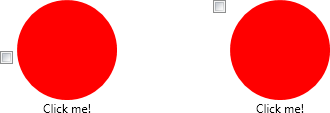
He wanted the checkmark box positioned on the upper left, as in the second image.
The default template for the CheckBox is basically a BulletDecorator; its Bullet property is set to a BulletChrome object (that's the checkmark box) and its Child property is set to a ContentPresenter (that's for the content of the control). After fooling around setting a few alignment properties, I couldn't get that checkmark box to budge. I suspect the vertical positioning is hard-coded in the ArrangeOverride method in BulletDecorator.
So I re-thought the template's visual tree: Rather than a BulletDecorator I began with a Border. I set the Child to a Grid with two auto-width columns. The first column contains a BulletChrome object with its VerticalAlignment property set to Top. The second column is the ContentPresenter. Everything else in the template is identical to the default CheckBox template (which I snagged using the DumpControlTemplate program from Chapter 25 of my book Applications = Code + Markup). This new template doesn't use a BulletDecorator element at all.
Here's the XAML file that produced the screen shot shown above:
UpperLeftCheckBoxTemplate.xaml
The new template is in the Resources section. I cleaned up some of the syntax of the default template and just commented out the old visual tree.