Rounded Graphics in WPF
April 17, 2008
Roscoe, N.Y.
A recent MSDN WPF Forum posting inquired about drawing triangles with rounded corners. I responded with some code but thought it might be good to repeat it here with some visuals.
I originally used the Path element for drawing the triangles; for some variety — and also to re-use a Pen object in my code — here I'll render the figure with an Image displaying a DrawingImage based on a GeometryDrawing.
WPF supports rounded corners with the LineJoin property of the Pen class. The only catch is that your stroke thickness must be appreciable before this LineJoin property becomes evident. If you really want to draw thick lines with rounded corners, just set LineJoin to the PenLineJoin enumeration value Round. Here's some XAML:
-
<Page xmlns="http://schemas.microsoft.com/winfx/2006/xaml/presentation">
<Image Margin="24">
<Image.Source>
<DrawingImage>
<DrawingImage.Drawing>
<GeometryDrawing Geometry="M 300 100 L 500 400 100 400 Z">
<GeometryDrawing.Pen>
<Pen Brush="Blue" Thickness="96"
LineJoin="Round" />
</GeometryDrawing.Pen>
</GeometryDrawing>
</DrawingImage.Drawing>
</DrawingImage>
</Image.Source>
</Image>
</Page>
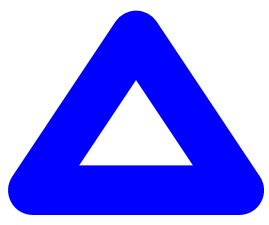
That results in the following visual:
Add a
-
Brush="Blue"
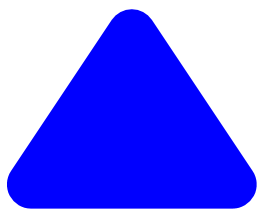
attribute to the GeometryDrawing tag and you'll get a filled triangle:
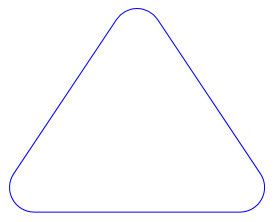
However, if you want a triangle with a thin stroke, this approach won't help. You'll need another solution that involves some code. The RoundedTriangle.cs and RoundedTriangle.csproj files comprise a program that displays four progressively derived triangles in the cells of a UniformGrid. The first triangle is based on a PathGeometry named pathGeo and is the same as the first figure shown above.
The second figure is based on a PathGeometry obtained from a call to the GetWidenedPathGeometry method of pathGeo:
-
PathGeometry pathGeoWidened = pathGeo.GetWidenedPathGeometry(penThick);
The Pen argument is required because the method calculates a path that surrounds the original path as if drawn with the pen. My program then strokes this path with a thin pen:
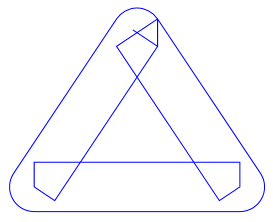
Those artifacts are typical with widened paths. However, it's possible to call the GetOutlinedPathGeometry method on this widened path:
-
PathGeometry pathGeoOutlined = pathGeoWidened.GetOutlinedPathGeometry();
That returns a new path that is the outline of the existing path, or:
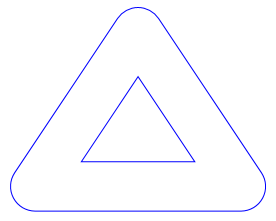
We're getting very close! This PathGeometry obviously has two PathFigure objects in its Figures collection. We only want one of them, and the one we don't want probably has a single item in its Segments collection of type PolyLineSegment. Let's see if we can remove it. It's first necessary to clone the outlined path because we need something we can alter:
-
PathGeometry pathGeoCloned = pathGeoOutlined.Clone();
Now loop through the PathFigure objects and see if there's a good candidate for removal:
-
for (int i = 0; i < pathGeoCloned.Figures.Count; i++)
{
PathFigure fig = pathGeoCloned.Figures[i];
if (fig.Segments.Count == 1) // ie, a PolyLineSegment
pathGeoCloned.Figures.Remove(fig);
}
And that does it! The resultant PathGeometry looks like this: